
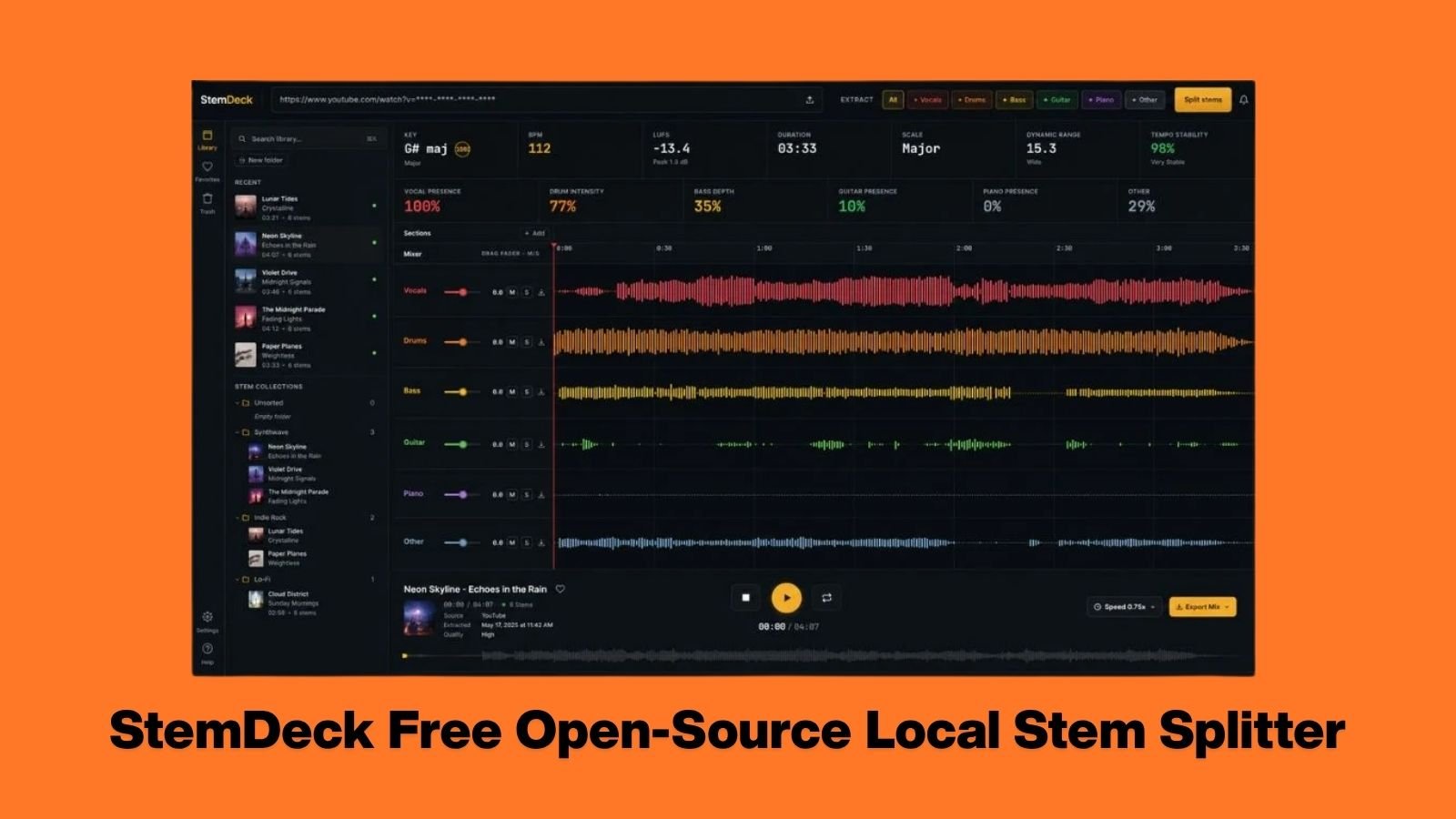
Isolating vocals, pulling drum breaks, and extracting basslines used to require expensive software or risky third-party cloud services. For producers looking to create bootleg remixes or extract vintage samples, the landscape has been dominated by subscription models and online processing queues.
Solo developer Thales Claro is changing that workflow entirely with the release of StemDeck, a completely free, open-source stem separation tool for Windows, macOS, and Linux.
Originally built by the developer to help his child practice drums by isolating tracks, StemDeck has quickly evolved into an incredibly powerful utility for the broader music production community. It operates entirely locally on your machine, meaning it requires no account, no quotas, no cloud uploads, and absolutely no monthly subscription fees.
Under the Hood: The Demucs Engine
While we have seen other stem separation tools hit the market, StemDeck stands out for its straightforward, user-friendly implementation of highly advanced machine learning.
The software utilizes the open-source Demucs htdemucs_6s model to slice mixed audio into up to six distinct stems:
- Vocals
- Drums
- Bass
- Guitar
- Piano
- Others (Synths, FX, atmospheric pads)
To ensure the extraction process is as fast as possible, StemDeck automatically detects and utilizes the best available hardware acceleration on your computer. It fully supports CUDA on NVIDIA systems, MPS on Apple Silicon, and will seamlessly fall back to CPU processing if dedicated hardware is not available.
This makes it an ideal companion tool. You can rip a drum break from a classic track, isolate it with StemDeck, and immediately drop the clean stem into your TubeOhm TO-Sampler to build a massive, retro-flavored drum kit.
Browser-Based Mixing and Advanced Analytics
Once the stem separation is complete, the software opens a highly intuitive, browser-based multitrack mixer. This interface provides producers with granular control over the extracted audio before exporting it into their primary workspace.
If you are using one of the Best FREE DAWs for Synthwave & Electronic Music, you can use this interface to perfectly prep your samples before dropping them into your project timeline.
StemDeck Key Features & Capabilities
| Feature | Description |
| Broad Import Support | Accepts MP3, WAV, FLAC, OGG/Opus, MP4, M4A, and direct YouTube URLs. |
| Multitrack Mixer | Mute, solo, balance, zoom, and loop specific sections of the extracted stems. |
| “Original” Lane | Generates a lane containing unselected stems for seamless A/B mix checking. |
| Song Analysis | Automated BPM detection, key and scale estimation, integrated LUFS, and sample peak data. |
| Video Muxing | Supports MP4 export, allowing you to mux your custom isolated mix directly back onto a source video. |
| Local Network Control | Run the heavy processing on a main studio PC while controlling the mixer from a laptop or tablet on the same network. |
Disclaimer: While StemDeck supports YouTube URL imports, it is a processing tool, not a piracy downloader. Users are strictly responsible for respecting copyright laws and platform terms when preparing audio for remixes or sampling.
Setup and Alpha Performance
It is important to note that StemDeck is currently in its alpha stage. While the developer explicitly notes it is not meant to replace highly polished commercial studio services, the separation quality is remarkably high. It is more than capable enough for remix preparation, transcription, and heavy sampling experimentation.
If you are looking to study the arrangement of the Essential Synthwave Songs of August 2026, running the tracks through StemDeck allows you to isolate the basslines and synths to see exactly how top-tier producers layer their mixes.
First Launch Note: When you boot StemDeck for the first time, the application will automatically download the required Python runtime environment, FFmpeg, and the Demucs machine learning model. This initial setup takes a few minutes, but all subsequent launches are virtually instantaneous.
For installation, Windows users can select between CPU-only or NVIDIA CUDA builds, while macOS users are provided with distinct downloads for both Apple Silicon and legacy Intel machines.
Download and Resources
StemDeck has been a massive word-of-mouth success, pulling in over 13,000 downloads and 2,000 stars in just two months. You can download the software and view the source code directly through the links below:
- Download StemDeck: Official GitHub Repository
- Learn More About the Engine: Demucs Audio Source Separation